A coding agent can inspect a project, propose a plan, edit files, run commands, and explain what changed.
But where do you see that work?
One agent may have its own terminal interface. Another lives inside a particular editor. A third has a desktop app. If every editor needs a custom integration for every agent, changing either side becomes expensive.
The Agent Client Protocol, or ACP, creates a shared seam between them.
ACP standardizes how a user-facing client—often a code editor or IDE—communicates with a coding agent. The editor can provide the interface. The agent can provide the coding behavior. They exchange structured messages instead of depending on one private integration.
The simplest description is:
ACP lets an editor and a coding agent hold a working session together.
The Two Sides
The ACP specification calls the two sides the client and the agent.
The client is the interface the developer uses. It might be Zed, JetBrains, a Neovim plugin, a desktop application, or another ACP-compatible surface. It displays messages, plans, tool activity, diffs, permission prompts, and completion states. Depending on the capabilities it advertises, it may also provide access to files or terminals.
The agent is the program doing the coding work. It receives prompts, manages its own reasoning loop, chooses actions, reports progress, and ends each turn with a result. ACP agents are commonly launched as subprocesses of a local client, though the protocol is also being developed for remote use.
ACP does not make the editor an agent or the agent an editor. It gives them a contract for talking to each other.
Underneath, ACP v1 uses JSON-RPC 2.0. That is a structured request-and-response format software can exchange over a connection. You do not need to read the JSON to use ACP, just as you do not need to read network packets to use a browser.
What One ACP Session Looks Like
The protocol becomes easier to understand as a short timeline.
1. The client and agent introduce themselves
Every connection begins with initialize.
The client says which ACP version and capabilities it supports. The agent responds with the version and capabilities it supports. If they cannot agree on a protocol version, the client should close the connection and explain the problem.
Capabilities matter because ACP support is not all-or-nothing. One client may provide file reading, file writing, and terminals. Another may provide only part of that set. One agent may support loading old sessions or image prompts. Another may not.
The connection can then authenticate if the agent requires it.
2. The client opens a session
The client calls session/new with a working directory and any MCP servers the agent should use. The agent returns a session ID.
That working directory tells the agent which project it is entering. The session ID gives both sides a way to keep messages and updates attached to the same conversation.
An agent may also support session/load, which restores a previous session and replays its history to the client. That feature is optional. A session created by one agent is not automatically portable to every other agent, and clients must check that loading is supported before requesting it.
3. The developer sends a prompt
The client sends session/prompt with the user's message.
For example:
Find why this test fails, propose a fix, and ask before changing the database migration.
The agent begins its turn. It might inspect files, build a plan, call tools, run a test, or ask for more information.
4. The agent streams what is happening
The client does not need to stare at a spinner until the entire job finishes.
During the turn, the agent sends session/update notifications. Those updates can include message chunks, tool calls and their changing status, plans, commands, or mode changes. The client decides how to present them: a chat timeline, a plan panel, a diff view, a terminal card, or something else.
This is one of ACP's most useful boundaries. The protocol describes the events. The client owns the experience of showing them.
5. The client handles permission requests
When an action needs authorization, the agent can call session/request_permission.
The client shows the available choices to the user and returns the selection. That could mean allowing one command, rejecting it, or choosing an option the agent supplied.
ACP carries the request and response. It does not decide which actions are safe, invent the user's policy, or guarantee that every implementation asks at the same moments. Sensible permissions still depend on the client, agent, environment, and task.
6. The turn stops
When the agent finishes, it responds to the original session/prompt request with a stop reason.
The client can also send session/cancel while work is underway. Cancellation is a request to stop the operation; it is not a promise that every external side effect can be undone.
ACP and MCP Solve Different Connection Problems
ACP and MCP appear in the same systems, which makes them easy to confuse.
They connect different layers.
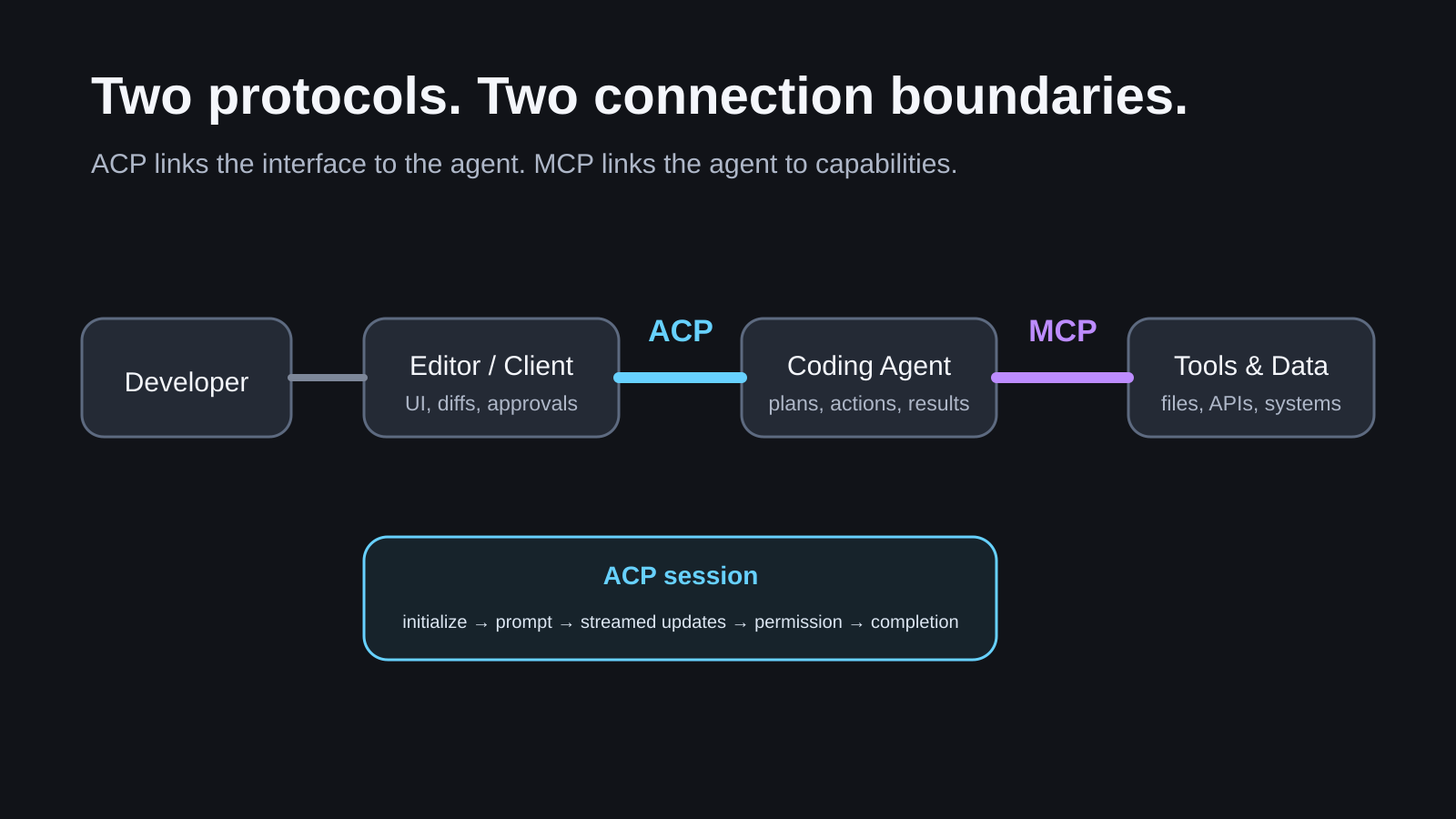
ACP connects a client interface to a coding agent.
MCP connects an AI application or agent to tools and data.
The stack can look like this:
Developer → editor/client → ACP → coding agent → MCP → tools and data
Suppose a developer asks an agent in an editor to investigate a failed deployment. ACP can carry the prompt, streamed plan, tool-call updates, permission request, and final status between the editor and agent. MCP might separately give that agent a standard way to query a deployment system or issue tracker.
The fuller explanation of that lower connection is in What MCP Actually Connects.
Calling ACP “MCP for agents” hides the important boundary. ACP includes interaction patterns for coding-agent sessions: progress, plans, diffs, tool-call presentation, permissions, cancellation, and completion. MCP focuses on exposing tools, resources, and prompts to an AI application.
They can work together. They are not interchangeable.
What ACP Does Not Guarantee
A shared protocol reduces integration work. It does not make every combination identical.
ACP does not guarantee:
- the same model quality from different agents
- the same tools, modes, or media support
- identical permission policy
- identical session storage or portability
- support for every optional method
- safe execution merely because messages use a standard format
- full remote-agent support today
The initialization step exists partly because clients and agents need to negotiate what is actually available. A good ACP client should adapt to those capabilities rather than assume the largest feature set.
Remote agents deserve particular care. The official introduction says ACP is intended for local and remote scenarios, but full remote support remains a work in progress. Local agents normally communicate with clients over standard input and output. Remote transports, authentication, reconnection, and hosted security introduce additional design work.
What Supports ACP Now
The ecosystem is already broader than one editor and one agent, but the support list changes quickly.
The official client directory currently includes editors and integrations such as Zed, JetBrains, Neovim plugins, Qt Creator, Visual Studio and VS Code extensions, plus desktop, web, command-line, notebook, mobile, and messaging clients.
The curated ACP Registry lists agents that support authentication. Current entries include adapters or implementations for Codex, Claude Agent, Gemini CLI, GitHub Copilot, Cursor, Cline, goose, OpenCode, Qwen Code, and others.
Those directories prove ecosystem activity, not perfect compatibility. Registry versions move independently. Some products implement ACP directly; others use adapters or plugins. The useful check is always the specific client, specific agent, and specific capabilities you plan to use.
As of this review, the current major protocol is v1, and the latest schema release in the official repository is schema-v1.20.0, published July 21, 2026. Non-breaking features can arrive through capability negotiation without changing the major version.
Why the Boundary Matters
Before ACP, an editor team that wanted five coding agents might need five custom integrations. An agent team that wanted to appear in five editors faced the same problem from the other direction.
A shared protocol does not erase all integration work. It gives that work a stable center.
Editor makers can focus on interaction: messages, plans, diffs, approvals, terminals, and session controls. Agent makers can focus on coding behavior: understanding the project, choosing actions, using tools, and producing a result.
For developers, the benefit is choice. The interface and the agent no longer have to be one inseparable product.
That is ACP's worthwhile idea. It does not make every coding agent equal.
It makes the conversation between an editor and an agent explicit enough that more than one pair can participate.